
In an era where data is abundant but time is limited, AI tools can offer a powerful assist. I believe it is possible we can use AI for research in a way that actually enhances our understanding of complex topics without denying ourselves the intellectual growth that comes from actively researching a topic. For me, this means using AI tools to source, aggregate, and summarize information that is relevant to my questions.
A Quick Summary:
- AI for research is revolutionizing how we gather, organize, and synthesize knowledge.
- Google’s NotebookLM enables document-based exploration of large information sets.
- OpenAI’s ChatGPT Deep Research allows detailed, context-aware investigations.
- Google’s Gemini Deep Research blends powerful AI modeling with Google’s search ecosystem.
- Each tool offers unique strengths for different types of research tasks.
Whether you’re a student, researcher, content creator, or just a curious mind, understanding how to use these tools can unlock incredible efficiencies in exploring and mastering new topics.
This mindset relates to my 10 AI Principles, in that AI literacy should be a basic skill. We should seek to find ways in which AI can improve our lives, and in my humble opinion, spending way less time hunting around for answers to questions or to find statistical data is a very real positive.
The Three Main AI Research Tools I Use
As of today, there are several standout AI tools that make research easier and faster and which I think are worthy of mention. I’ve been using a combination of these for the last year or so, primarily to gather information about new topics or areas of study. Prior to having these tools available, I would have spent many hours Google searching halfway across the Internet and back, whereas now I can collect way more citations in a fraction of the time.
Disclaimer
I have to mention though, just because it feels great that these tools are helping me collect data and citations very quickly, it is still very important to review what has been retrieved and validate it. These AI tools aren’t perfect and sometimes “hallucinate”, basically make make up information, or make mistakes and errors.
My List of AI Research Tools:
- Google’s NotebookLM
- ChatGPT Deep Research
- Google Gemini Deep Research
Google’s NotebookLM is designed for document-based exploration, allowing users to upload materials and get grounded, source-cited answers. OpenAI’s ChatGPT Deep Research brings the ability to dive into complex topics with an expanded memory and context window, making it ideal for step-by-step reasoning and detailed analysis. Meanwhile, Google’s Gemini Deep Research blends cutting-edge AI with real-time web access, offering summarization, fact-checking, and synthesis of long-form web and academic content.
The Deep Research tools use a form of Retrieval Augment Generation (RAG), which means they primarily use resources they go and retrieve as part of the research report generation process. The overall research report generation for both Deep Research tools can take anywhere from 5 to 20 minutes. I think it just comes down to how complex the research question topic is.
As of April 2025, each of these three AI research tools has a form of access that is available for free. The caveat though is that for NotebookLM some features are locked behind a “Plus” subscription, and for ChatGPT Deep Research and Google Gemini Deep Research the free tier provides a limited number of uses. Approximately 5 uses per month.
Overall, each tool has unique strengths that make them suited to different kinds of research needs. Let’s take a closer look at each one of them.
NotebookLM by Google
NotebookLM is Google’s AI-powered research assistant designed to help users deeply explore and analyze documents. Initially released in limited preview in July 2023 and expanded in 2024, NotebookLM allows you to upload your own sources, like PDFs, Google Docs, and copied text, and then ask questions directly based on those materials.

How to Access:
- Visit notebooklm.google and sign in with your Google account.
- Upload documents or copy and paste content into your Notebook.
Features:
- Source-grounded answers: It only responds based on the uploaded content.
- Inline citations and clickable source links.
- Summarization of full documents or specific sections.
- Brainstorming and question refinement features.
- Can generate a synthesized podcast with virtual podcasters that discuss your topic, and you can actually interact and ask questions. This is one of the main features which really caused people to take notice of NotebookLM.
How to Use:
- Upload multiple documents related to your research.
- Ask targeted questions to summarize, analyze, or compare information.
- Use it to quickly identify key points, conflicting viewpoints, or recurring themes across a collection.
Strengths:
- Great for exploring new topics where you have a batch of reference materials.
ChatGPT Deep Research by OpenAI
This feature, available in ChatGPT for all users, leverages advanced long-context capabilities to engage in focused, multi-step reasoning.

When Released:
- Rolled out incrementally during early 2024.
How to Access:
- Available in the ChatGPT app (chatgpt.com) by clicking the [Deep Research Button].
- It is available to all users of ChatGPT, but premium plans let you use it more often each month.
Features:
- Up to 128K tokens of context window, enabling deep conversations.
- Can analyze long documents or maintain coherence across many steps.
- Integration with custom instructions and memory for personalized context.
How to Use:
- Paste or upload a long research article, ask for summaries or critical analyses.
- ChatGPT will then respond with clarifying questions to help it focus the research in areas that are appropriate. It will then start searching for relevant sources and provide you a tracker that demonstrates its ongoing research process.
- Ask follow-up questions to refine understanding or challenge assumptions.
Strengths:
- Ideal for tackling detailed questions that require persistent focus across several steps.
Gemini Deep Research by Google
Gemini, Google’s multimodal AI, also includes powerful research capabilities integrated with Google Search and Workspace.
When Released:
- Gemini’s advanced features began rolling out in late 2023, with deep research tools evolving through 2024.
How to Access:
- Accessible through the Google Gemini app or gemini.google.com.
- Also embedded in Google Workspace (Docs, Sheets, Gmail).
- It is available to all users of Gemini, but premium plans let you use it more often each month.
Features:
- Combines web access with summarization, analysis, and organization tools.
- Able to parse long web documents and academic articles.
- Real-time fact-checking via search.
How to Use:
- Ask specific research queries and receive summaries with source links.
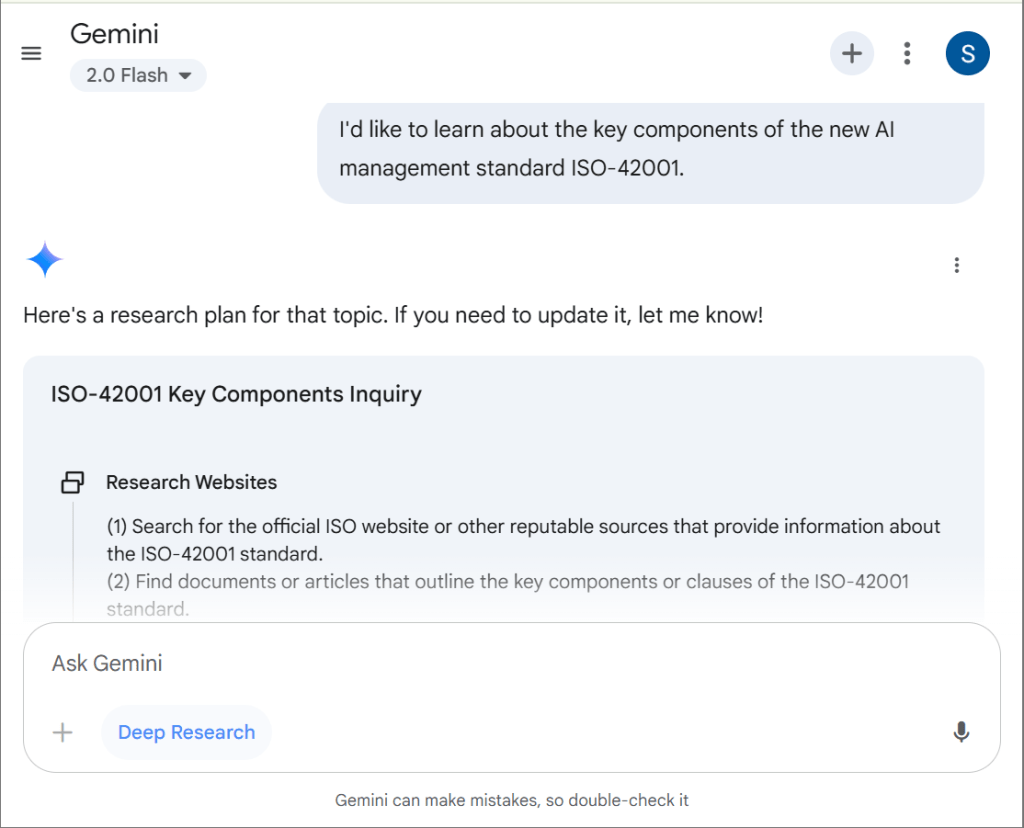
- Gemini Deep Research will first produce a research plan which you can edit and then accept. This research plan will guide how the AI approaches its research.
- Combine Gemini with Google Docs for collaborative exploration.
- Use it to break down complex topics into digestible insights.
Strengths:
Very effective integration with Google’s mature search ranking ecosystem.
Final Thoughts
Tools like NotebookLM, ChatGPT Deep Research, and Gemini Deep Research each shine in different scenarios. I personally find NotebookLM very useful when exploring broad new topics and uploading varied source materials. For more focused and nuanced questions, I lean on ChatGPT or Gemini’s Deep Research modes to get data on a more focused research topic. For those of you trying to collect information on a very challenging topic, I highly recommend exploring how these tools can assist with collecting and presenting information to aid you in your learning.
[mailerlite_form form_id=3]
 Sapiens Forward